
Pricing and Billing
How Segmind charges for model APIs: per GPU-second or per generation, how GPU type affects cost, plus subscription plans and how billing works.
Model API pricing
Model usage is charged either per GPU-second or per generation. Which one applies is on each model's pricing tab — for example gpt-image-1 pricing.
Per GPU-second
Requests are charged on GPU processing time, measured per second, so each request costs according to how much GPU compute it consumes.
Models are hosted across a range of GPUs (A100, H100, L40S) and cloud providers, so price varies by model depending on the underlying hardware. Models on higher-end GPUs cost more per second but finish faster.
Each model's page carries its price, GPU type, and expected generation speed — for example z-image-turbo pricing.
Per generation
Credits are deducted per generation. Parameters such as the number of seconds of video or the output resolution can change the price of a single generation, so check the model's pricing page for exact figures.
To see what you have actually been charged, use Generations for what you ran, Cost Analytics for what it cost over time, and Billing → Transaction History for individual charges and credits. All three are in the left nav.
Billing logic
Segmind reserves credits before a model runs, against an estimate based on the model and its expected processing time. That reservation is what stops a request starting that you cannot afford — a call is refused outright when your balance is below the cost of the model you are calling.
The reservation itself is internal. What you can observe on your balance is simpler:
| While the request is | Your balance |
|---|---|
| running | unchanged — there is no temporary dip to wait out |
| completed | drops once, by the actual cost of that run |
| failed | unchanged — nothing is charged |
The amount finally deducted is the actual cost, which can be lower than the estimate that was reserved. You are never charged the estimate.
Key point: if a request fails for any reason — invalid parameters, server errors, timeouts, content moderation — nothing is charged. This holds whether the request was rejected before the model started or failed part-way through: a failed asynchronous result comes back with timings but no cost field at all. You only pay for requests that return a successful response.
For the exact figure on a given call, read x-cost from a synchronous response
or metrics.cost from an asynchronous one, rather than diffing your balance.
See Account and Billing APIs for
reading your balance programmatically, and
Cost Analytics for totals over
time.
PixelFlow pricing
Running a PixelFlow workflow costs the sum of its parts — the cost of running each model in the workflow.
Subscription plans
Plans are billed monthly and include a credit allowance. Full details, including storage and support terms, are on the pricing page.
| Plan | Price | Monthly credits |
|---|---|---|
| Flexible | Pay as you go | — (top up from $10) |
| Pro | $39/month | $50 |
| Business | $99/month | $99 |
| Scale | $599/month | $599 |
| Enterprise | Custom | Custom |
On Pro the credits are worth more than the subscription — $39 buys $50 of credits. On Business and Scale the allowance matches the price.
Adding credits
Every account starts on the Flexible plan, shown as Free Plan in the console until you subscribe. You can start with a top-up of as little as $10.
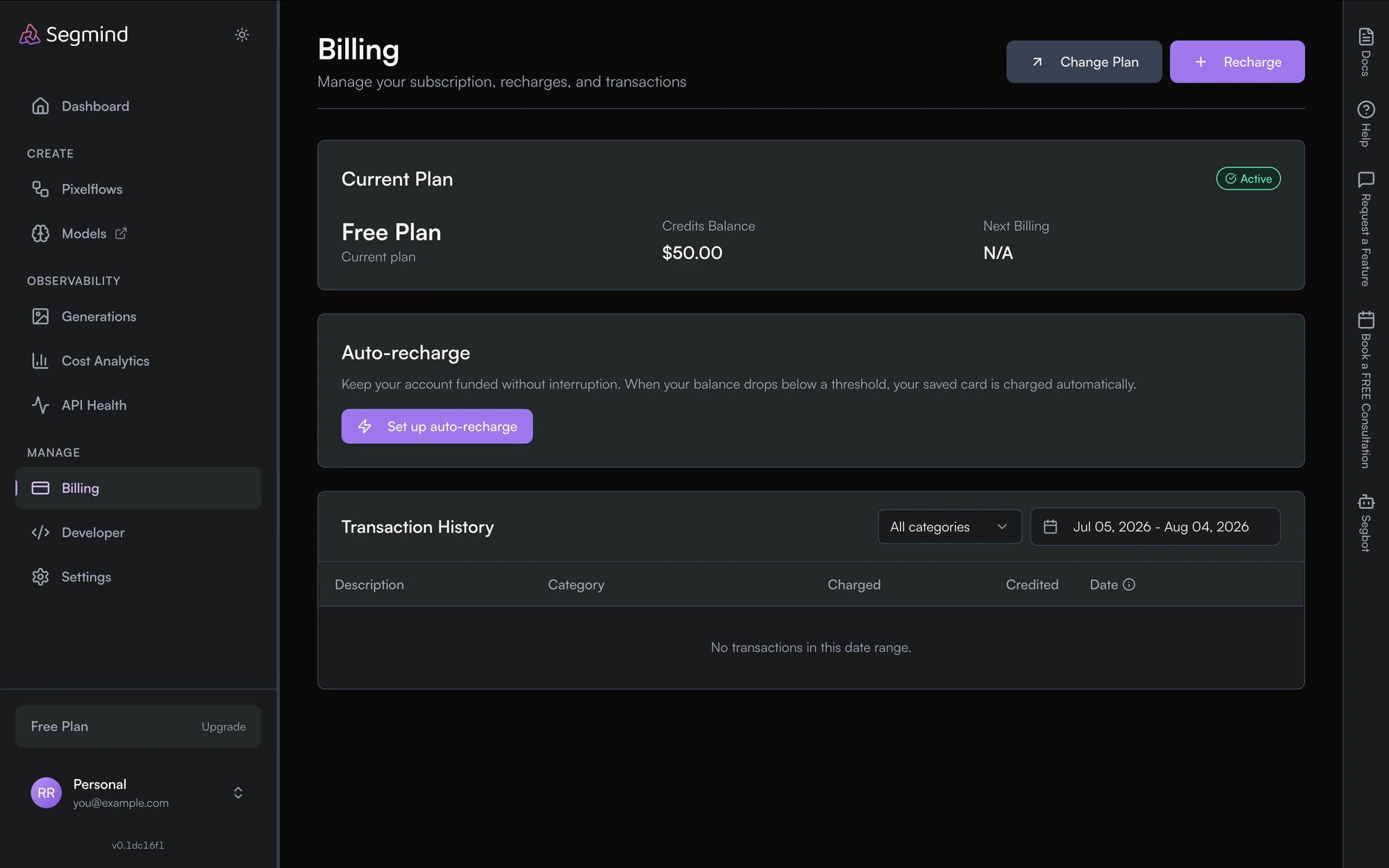
Billing in the left nav gives you three things:
- Recharge — add any dollar amount with a card. Change Plan switches subscription tier.
- Auto-recharge — save a card and top up automatically whenever your balance falls below a threshold you set, so requests don't start failing mid-run.
- Transaction History — every charge and credit, filterable by category and date range.
Join our Discord with any billing questions.